KeyCraft - Free Windows Shortcut & Automation Tool
A downloadable tool
【Free Windows Shortcut Tool · No Coding Required to Get Started】
Turn repetitive PC actions into one-button shortcuts.
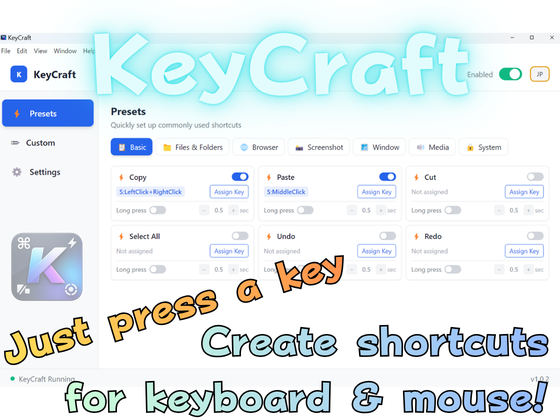
KeyCraft is a completely free Windows tool that lets you assign useful actions to keyboard keys, mouse buttons, and other inputs.
No scripting or coding knowledge is required. Choose from the built-in presets, press the key or mouse button you want to use, and your shortcut is ready.
Advanced users can also create custom functions, combine multiple actions, and write AutoHotkey v2 scripts.
✅ COMPLETELY FREE
All features are available at no cost for both personal and commercial use.
No paid feature restrictions.
✅ EASY SHORTCUT CREATION
• Press a key or mouse button to register it
• 65 ready-to-use presets
• Enable or disable individual shortcuts
• Temporarily pause all KeyCraft shortcuts
• Combine multiple keys
• Assign different actions to a tap or long press
• Create multi-step input sequences
✅ KEYBOARD, MOUSE & GAMEPAD SUPPORT
Assign actions to keyboard keys and mouse buttons.
Mouse inputs are displayed with easy-to-understand names such as:
• Right Click
• Back Button
• Forward Button
• Middle Click
• Wheel Up / Wheel Down
Advanced Mode also supports AutoHotkey v2 and gamepad inputs from Joy1 to Joy32.
✅ BUILT-IN ACTIONS
Launch and File Actions
• Open applications
• Open files and folders
• Open the Downloads folder or Desktop
• Open websites and URLs
• Launch executable files
Keyboard and Text Actions
• Copy, paste, cut, undo and redo
• Save, search, print and select all
• Type frequently used text automatically
• Execute multiple keyboard actions in sequence
• Switch Japanese input and Caps Lock
Window and System Actions
• Maximize or minimize windows
• Close the active window
• Switch fullscreen mode
• Show the Desktop
• Switch between applications and windows
• Take full-screen or region screenshots
Media Actions
• Volume up and down
• Toggle mute
• Play and pause
• Previous and next track
• Other media-key actions
✅ CREATE YOUR OWN FUNCTIONS
KeyCraft is not limited to the included presets.
You can combine actions or write your own AutoHotkey v2 scripts to create shortcuts designed for your workflow.
For example:
• Launch an application and perform an action automatically
• Execute several keyboard inputs in sequence
• Combine text input with keyboard commands
• Turn a repetitive workflow into a single button
• Add actions not included in the standard presets
• Build custom functions for your own work environment
Core features require no scripting, while Advanced Mode gives experienced users much greater flexibility.
✅ IMAGE, VIDEO & AUDIO METADATA REMOVAL
Files exported from Canva, Premiere Pro, cameras, phones, and other software may contain metadata such as:
• Author or user names
• Software information
• Creation and modification dates
• Camera or device information
• GPS and location data
• Comments and titles
• Local folder paths
KeyCraft can create an anonymized copy with detectable standard metadata removed.
Examples:
• picture.png → picture.kf.png
• movie.mp4 → movie.kf.mp4
• music.mp3 → music.kf.mp3
Privacy features:
• The original file is not modified
• Processing is performed locally on your PC
• Files are not uploaded to an external server
• No internet connection is required
• The processed file is inspected again after conversion
Supported formats:
Images:
PNG, JPEG, JPG, WebP and GIF
Video:
MP4, MOV, MKV, WebM and AVI
Audio:
MP3, WAV, FLAC, OGG, Opus, M4A and AAC
Important:
The anonymization feature removes detectable standard metadata. It does not remove information that is visible in an image or video, audible in an audio recording, or included in the original file name.
Always check the processed file before publishing it.
Executable files, documents and compressed archives are not supported by the anonymization feature.
✅ STARTUP & SYSTEM TRAY SUPPORT
KeyCraft can start automatically with Windows and remain available in the background.
• Start minimized with Windows
• Show or exit KeyCraft from the system tray
• Prevent multiple copies from running
• Pause shortcut processing while the PC is asleep
• Automatically restore shortcut processing after wake-up
Open the main window only when you need to change your shortcuts.
SYSTEM REQUIREMENTS
• Windows 64-bit
• Japanese and English interface
• Internet connection not required
INSTALLATION
1. Download and extract the ZIP file.
2. Run “KeyCraft Setup 1.1.2.exe”.
3. Follow the installer instructions.
4. Open KeyCraft and choose a preset or create a custom shortcut.
5. Enable startup from Settings if required.
If an older version is already installed, the installer can update it in place. Existing settings and shortcuts are normally retained.
Make everyday PC work faster, easier and more comfortable with KeyCraft.
Download
Click download now to get access to the following files:
Leave a comment
Log in with itch.io to leave a comment.